Skip to content
View in the app

A better way to browse. Learn more.

The Patriot Woodworker

A full-screen app on your home screen with push notifications, badges and more.

To install this app on iOS and iPadOS
  1. Tap the Share icon in Safari
  2. Scroll the menu and tap Add to Home Screen.
  3. Tap Add in the top-right corner.
To install this app on Android
  1. Tap the 3-dot menu (⋮) in the top-right corner of the browser.
  2. Tap Add to Home screen or Install app.
  3. Confirm by tapping Install.
Supporting Our Service Members
We proudly stand with all United States service members in Operation Epic Fury and those deployed around the world. Your sacrifice, courage, and dedication are deeply respected and never forgotten.

Part 4- Building The Frame

(0 reviews)

Now that the drum runs true and the table lift works, it was time to start building the frame. My intention was to use mortise and tenon joinery but my choice of material was 2 x 6 for the top and bottom of the sides. This was larger than my mortiser could handle. I know, I could have chopped them out by hand. I opted for half lap joints.

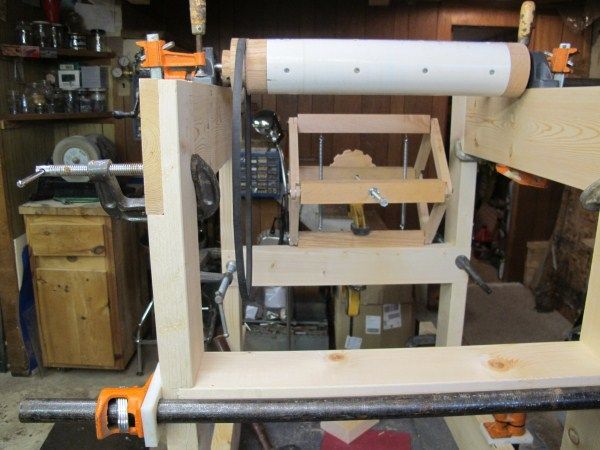
The overall width of the frame is 23” and the table height is about 31”. The length, at the bottom, is about 36”. The table is 16” x 24”. The frame is made of pine 2 x 4 and 2 x 6. All the joints are glued and screwed. The table is a piece of ¾” Melamine with ¾” plywood support and a 1” oak piece for the pivot hinge.

These photos are from the dry fit. I’m gonna need to get some more clamps!


(View 1,2,3,4)

1939826084_View1.jpg.e8d0f0a090877351abf5de24fac29983.jpg


834101350_view2.jpg.c5591d599a2b74c0e3af4bda2e3c9e4f.jpg


1790194331_View3.jpg.7f09c0da45599857bcd81d24fc4b4624.jpg


606723708_View4.jpg.c66ad9155f63327e23ed78ac1bb02ab7.jpg


To increase the structural integrity, I added two 2 x 4 cross members at the bottom of the front and back of the frame. You will be able to see them in a later section.

0 Comments

Recommended Comments

There are no comments to display.

Join the conversation

You are posting as a guest. If you have an account, sign in now to post with your account.
Note: Your post will require moderator approval before it will be visible.

Guest
Add a comment...

Account

Navigation

Search

Search

Configure browser push notifications

Chrome (Android)
  1. Tap the lock icon next to the address bar.
  2. Tap Permissions → Notifications.
  3. Adjust your preference.
Chrome (Desktop)
  1. Click the padlock icon in the address bar.
  2. Select Site settings.
  3. Find Notifications and adjust your preference.