




By Gerald
· 1,830 views
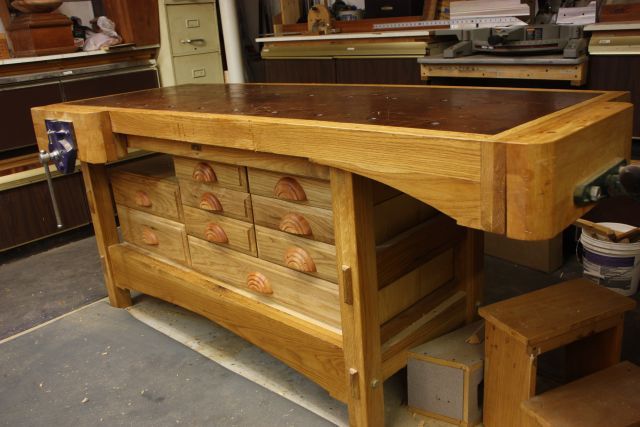
Where to start is to determine just what do you want to use the bench for. At the time for me it was flatwork and planing. I looked at many plans and decided on parts of several. Not sure where each part came from but the contributing plans were in Wood Magazine, Shop Notes and Popular Mechanics.
I started with the vices. Both are Lee Valley and maybe even paid full price. They are both front vices but one is mounted on the end. Next is to decide on the wood. I wanted White Oak and it is hard to find at the mill. Well, I did not want to pay 8 plus a foot for that so it took a couple years to find. I think I paid $2.50 a foot.
The design I put together has a three layer MDF (3/4) top plus 1/4 Masonite sacrificial layer. This is trimmed in 2 inch White Oak. Yes it took 2 people to move this into place. The legs are a three board glue up and have a center rail thru mortise connecting two end leg sets. The upper and lower rails are wrapped around a lower shelf of MDF and attached with bed bolts.
The drawer unit is designed to fit planes , chisels and other small woodworking tools. Full PIP with pictures will be next up just stay tuned.
Images
.jpg.41b3f0b6a0ac042d87f0c13793bdf09a.jpg)


.jpg.fb130bbb90b20e457419a5314f35abcd.jpg)


- Cal, Artie, Gunny and 2 others and 2 more...
-
 5
5
Recommended Comments
Join the conversation
You are posting as a guest. If you have an account, sign in now to post with your account.
Note: Your post will require moderator approval before it will be visible.