Skip to content
View in the app

A better way to browse. Learn more.

The Patriot Woodworker

A full-screen app on your home screen with push notifications, badges and more.

To install this app on iOS and iPadOS
  1. Tap the Share icon in Safari
  2. Scroll the menu and tap Add to Home Screen.
  3. Tap Add in the top-right corner.
To install this app on Android
  1. Tap the 3-dot menu (⋮) in the top-right corner of the browser.
  2. Tap Add to Home screen or Install app.
  3. Confirm by tapping Install.
Supporting Our Service Members
We proudly stand with all United States service members in Operation Epic Fury and those deployed around the world. Your sacrifice, courage, and dedication are deeply respected and never forgotten.
  • Entry

    1
  • Comments

    4
  • Views

    5,357

About this blog

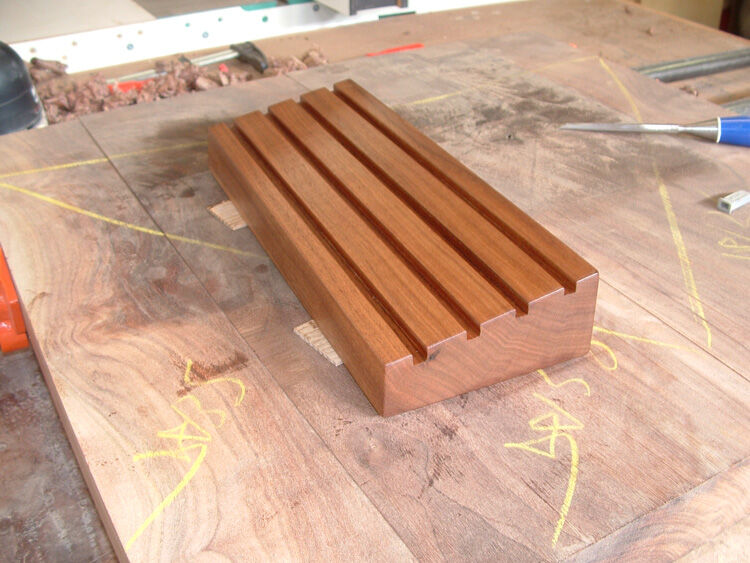
A display that anyone can build, for the military challenge coins that our troops receive frequently.

Entries in this blog

Thank you for joining us. Below is the Military Challenge Coin Display as described by The Patriot Woodworker network. This is a design that we drew up with the help of designs seen all over the web, it is easy to build, most folks have the tools that are necessary to build it, and the finishing process is quite simple. If you don't have the tools that I am using, your sure to find a way around that, as this is as I said, very simple to build. This basic display is 12" long, 4 1/2" deep, 1 1/8"
Courtland

Account

Navigation

Search

Search

Configure browser push notifications

Chrome (Android)
  1. Tap the lock icon next to the address bar.
  2. Tap Permissions → Notifications.
  3. Adjust your preference.
Chrome (Desktop)
  1. Click the padlock icon in the address bar.
  2. Select Site settings.
  3. Find Notifications and adjust your preference.